Missing backup alert
Set up an alert that notifies you when a datastore has had no successful backup within a configured window.
Last updated: June 10, 2026
Introduction
Cloud-PBS can automatically alert you when a datastore has received no successful backup for a duration you define. It’s a useful safety net: a backup job that stops running (broken schedule, host powered off, expired token…) no longer goes unnoticed.
Unlike Proxmox Backup Server’s verification, which checks the cryptographic integrity of existing backups, this alert watches for the absence of a new backup. For the background and the per-VM thresholds, read the announcement: per-VM missing-backup alerts.
Enabling the alert
The alert is configured independently for each datastore.
- Open your datastore in the dashboard.
- Go to the Notifications tab.
- Enable Missing backup (off by default).
- Set the threshold: a number, then the unit hours or days (for example 12 hours, or 7 days).
That’s it, the alert is active as soon as you save.
How it works
Cloud-PBS regularly checks the date of the last successful backup of each backup group, one group is one protected VM or host, in the datastore. If any group’s last successful backup is older than the configured threshold, an alert is raised and the affected group is named.
Evaluating each group individually matters: a recent backup of one VM never masks another VM in the same datastore that has silently stopped being backed up.
- Only a successful backup resets the clock for a group. A backup that ended in error does not count, since it doesn’t protect your data.
- A freshly created datastore that has never received a backup yet is measured from its creation date, so it isn’t flagged immediately.
Per-VM supervision
The datastore threshold is the default applied to every backup group, but you can fine-tune each group from the Backups tab, in the Supervision column:
- Supervise, turn supervision off for a group you no longer want to be alerted about (for example a decommissioned VM whose old snapshots are still retained).
- Custom threshold, give a single group its own delay, different from the datastore default (for example a critical VM backed up more frequently).
A group whose last backup is older than its effective threshold is flagged Overdue directly in the list.
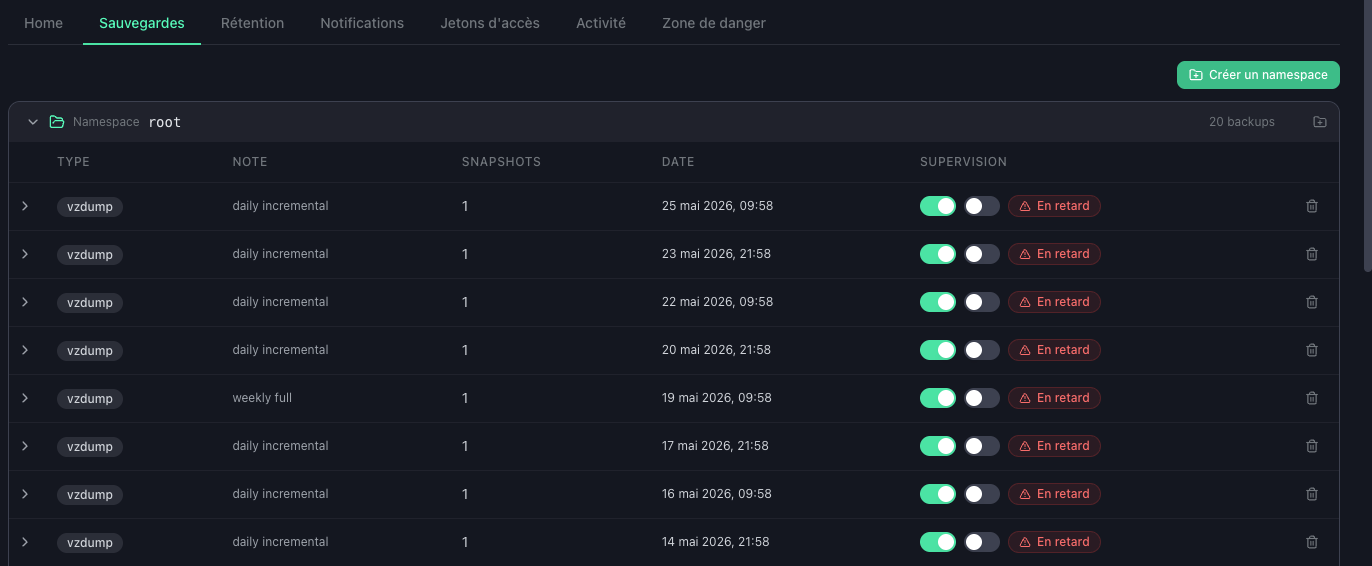
The per-group controls appear once the missing-backup alert is enabled on the datastore. A short in-app guide walks you through them the first time you enable it, and can be replayed anytime via the (i) button next to the alert toggle.
Notification channels
When the alert triggers, you’re notified via:
- Email to the datastore’s configured notification address;
- Webhook (if you’ve set one up);
- Notification center in the dashboard.
The affected datastore is also outlined in orange in the datastore list, with a “Missing backup” badge, for immediate spotting.
Frequency
While the condition persists, the alert is re-sent at most once every 24 hours to avoid spam. As soon as a new successful backup is recorded, the alert clears automatically and the datastore returns to its normal display.