Configure retention and purge a datastore
Set your backup retention policy from the Retention tab, and purge a datastore when needed.
Last updated: May 19, 2026
Retention determines how long your backups are kept. Prune is the operation that removes snapshots that fall outside that policy. Everything is configured from the Cloud-PBS dashboard. To understand exactly how the keep-* rules decide which snapshots survive, read how keep-last, keep-daily and keep-weekly actually work.
Accessing the retention settings
- Open the Cloud-PBS dashboard.
- Select the relevant datastore (instance).
- Open the Retention tab.
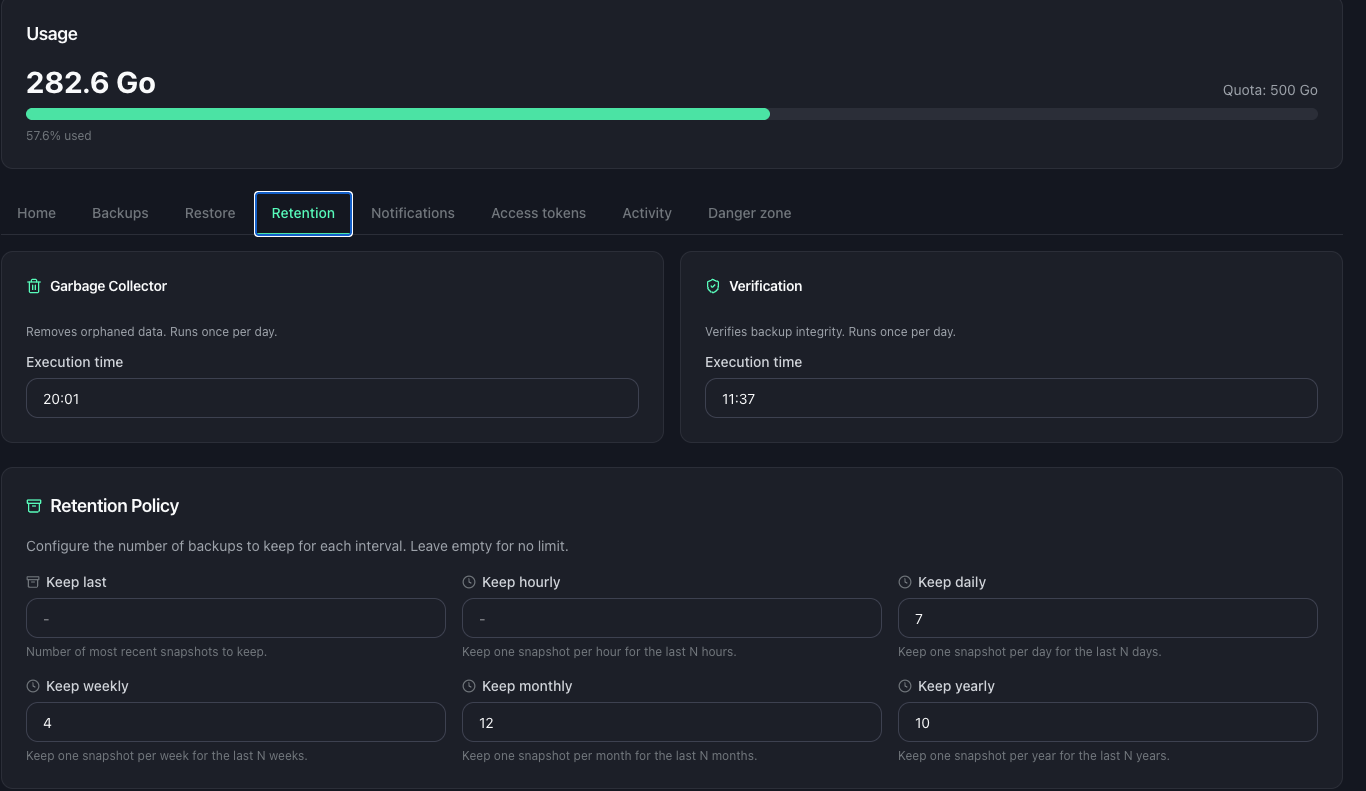
Retention parameters
The retention policy combines several rules. Each one sets a number of snapshots to keep for a given time granularity:
| Parameter | Effect |
|---|---|
| Keep last | Number of most recent snapshots to keep, regardless of their date. |
| Keep hourly | Keeps one snapshot per hour for the last N hours. |
| Keep daily | Keeps one snapshot per day for the last N days. |
| Keep weekly | Keeps one snapshot per week for the last N weeks. |
| Keep monthly | Keeps one snapshot per month for the last N months. |
| Keep yearly | Keeps one snapshot per year for the last N years. |
A parameter left at zero disables the matching rule.
How the rules combine
A snapshot is kept as soon as at least one rule retains it. A single snapshot can satisfy several rules at once: it may count both as the last snapshot of the day and the last snapshot of the week.
For example, with “daily = 7”, “weekly = 4” and “monthly = 6”, you keep a daily point for the last 7 days, then a weekly point over 4 weeks, then a monthly point over 6 months. The history thins out as you go further back: disk usage stays under control while keeping archive depth.
WARNING
A policy that is too restrictive deletes backups. Check your settings before saving them: snapshots removed by a prune cannot be recovered.
Once the policy is saved, it applies to the following cleanup cycles.
Purging a datastore
Purging a datastore deletes all of its backups. This is useful to start over from a clean datastore, or before decommissioning it.
The action is in the Danger zone of the datastore settings.
- Open the relevant datastore, then the Danger zone section.
- Click Purge datastore. All backups and their snapshots will be deleted, both on the PBS server and in the Cloud-PBS database.
- A confirmation is required: type
SUPPRIMERto confirm.
The Free disk space immediately option forces the cleanup: space is reclaimed at once, instead of waiting about 24 hours for the next garbage collection cycle.
CAUTION
Purging a datastore is irreversible. No backup can be recovered afterwards. Only use this action if you are certain you no longer need any of the datastore’s backups.