Proxmox Backup Server encryption: how to enable client-side encryption
Enable Proxmox Backup Server client-side encryption from Proxmox VE: AES-256-GCM keys, datastore configuration, restore considerations.
Last updated: May 21, 2026
What Proxmox Backup Server encryption is
Proxmox Backup Server encryption is client-side: each backup chunk is encrypted on your source Proxmox VE host with AES-256-GCM before it leaves the network, then stored already encrypted on the PBS datastore. The Proxmox Backup Server, and by extension Cloud-PBS, never sees your data in clear.
This page walks through enabling encryption from the Proxmox VE side, with the key management options that come with it. For the trust model behind it, what happens if you lose the key, and how encryption differs from immutability, read who really holds your keys.
Encryption is opt-in. A datastore created without an encryption key stores backups in deduplicated but unencrypted form. You can turn encryption on per-storage at any time, but backups already pushed before that point remain stored in their original form.
PVE configuration
Once your storage is configured on your Proxmox VE server:
-
On the left side select Datacenter ⇒ Storage ⇒ cloud-pbs.com
-
Click the Edit button
In the Edit dialog:
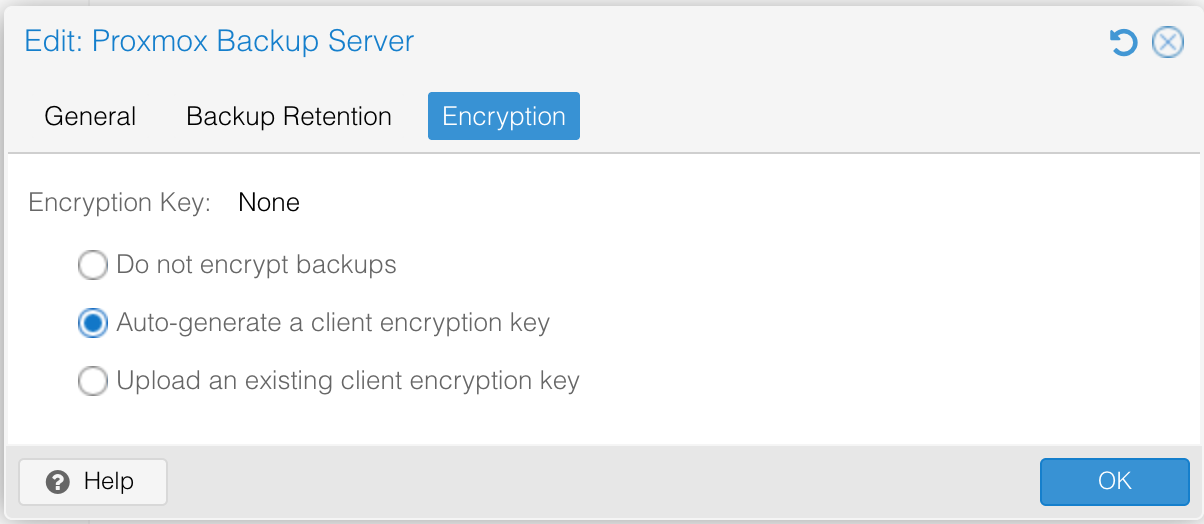
- Select Encryption ⇒ Auto-generate a client encryption key ⇒ OK
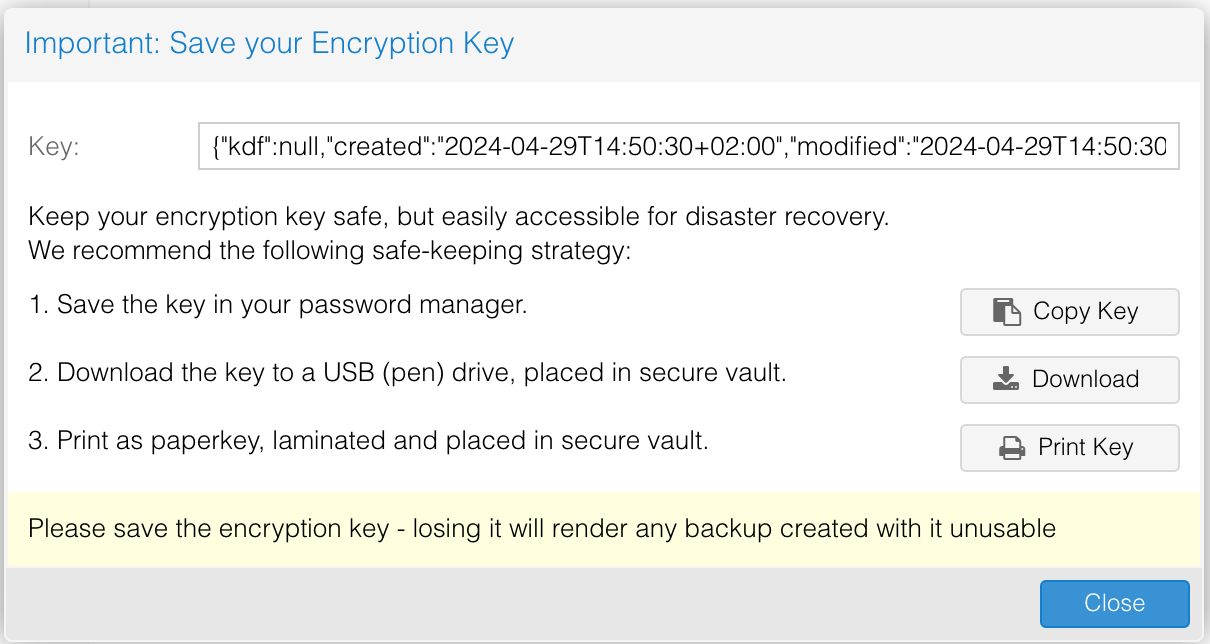
The next form shows you how to handle the generated key.
-
Save the key in your password manager. At Cloud-PBS we think this is the easiest option. Click Copy Key, paste it in your password manager, done.
-
Download the key to a USB drive. Useful to store the key offline. Copy the downloaded file to a USB drive and place that drive in a safe.
-
Print as paperkey. The most secure option, but the most painful to use when the day comes to restore.
Your backups are now encrypted client-side. Keep in mind: you will need the encryption key to restore your backups.
Frequently asked questions
What encryption algorithm does Proxmox Backup Server use?
Proxmox Backup Server uses AES-256-GCM for client-side encryption. Encryption happens on the Proxmox VE host before the backup chunks are sent over the network, so the PBS server only stores already-encrypted data.
Is encryption enabled by default in Proxmox Backup Server?
No. Encryption is opt-in per storage. A datastore created without an encryption key receives unencrypted chunks (still deduplicated and authenticated, but readable by anyone with admin access to the datastore). You can enable encryption on a per-PVE-storage basis at any time.
What happens if I lose the Proxmox Backup Server encryption key?
Backups encrypted with a lost key are unrecoverable. There is no recovery, no master key, no admin override. This is by design: the PBS operator (including Cloud-PBS) does not have access to your key, which is exactly the point of client-side encryption. Store the key in at least two independent locations.
Where should I store the Proxmox Backup Server encryption key?
Three patterns that work well:
- A password manager (vault) shared with the team that owns the PVE host.
- A printed paperkey kept in a physical safe.
- A copy on an offline USB drive stored geographically apart from the PVE host.
Avoid storing the key on the PVE host itself: an attacker that compromises the host would get both the data and the key.
Can I migrate an unencrypted datastore to encrypted?
You cannot retroactively encrypt existing backups, but you can switch a storage to encrypted on the PVE side. New backups will be pushed encrypted; old unencrypted snapshots stay readable until you prune them. For a clean cutover, enable encryption then schedule pruning of the unencrypted backup chain.
Does encryption affect deduplication?
No, as long as the same encryption key is used. Proxmox Backup Server deduplicates encrypted chunks based on their content hash, so two identical chunks encrypted with the same key still deduplicate. Different keys mean different ciphertext and therefore no cross-key dedup.
Related pages
- Restore an encryption key if you have a backup of your key and need to re-enable a PVE storage.
- Datastore API tokens and the permission levels you can grant.