Datastore API tokens: types and permissions
The four API token roles you can create on a Cloud-PBS datastore (DatastoreAdmin, DatastoreBackup, DatastoreReader, DatastoreAudit), what each allows, and which to use.
Last updated: July 22, 2026
Why API tokens
Cloud-PBS authenticates every connection to your datastore with an API token, not a user password. A token is made of an Auth ID (user@realm!token-name) and a Secret, and each token carries a role that defines exactly what it can do on that datastore. This lets you give each server only the access it needs, and revoke a single token without touching the others.
The token secret is shown only once, at creation. Store it safely: if you lose it, revoke the token and create a new one.
The four token roles
When you create a token on a datastore from the dashboard, you choose one of four roles:
| Role | Create backups | Restore / read | List (audit) | Prune / manage |
|---|---|---|---|---|
| DatastoreAdmin | Yes | Yes (all) | Yes | Yes |
| DatastoreBackup | Yes | Yes (own backups only) | Yes | No |
| DatastoreReader | No | Yes (all) | Yes | No |
| DatastoreAudit | No | No | Yes | No |
- DatastoreAdmin: full control of the datastore. Back up, restore any backup, prune, verify and manage. Use it sparingly.
- DatastoreBackup: a server can push backups and restore its own backups (it is their owner), but cannot read backups created by other tokens. The right choice for a production server that backs itself up.
- DatastoreReader: read and restore any backup on the datastore, without being able to create new ones. Ideal for a dedicated restore or recovery host.
- DatastoreAudit: inspect the datastore configuration and list snapshots (metadata only), with no access to the backup contents and no restore. Ideal for monitoring or supervision.
Which role should I use?
Follow the principle of least privilege:
- A Proxmox VE host that only sends its own backups: DatastoreBackup
- A recovery workstation that restores files or VMs: DatastoreReader
- A monitoring tool that only checks that backups exist: DatastoreAudit
- Full administration, rarely and for an operator: DatastoreAdmin
Create one token per server or purpose rather than sharing a single admin token. You can then revoke exactly the one that leaks or is decommissioned, without disrupting the others.
Create or revoke a token
From the dashboard, open your datastore and go to the Tokens tab:
- Click Create token, give it a name, pick the role, and confirm.
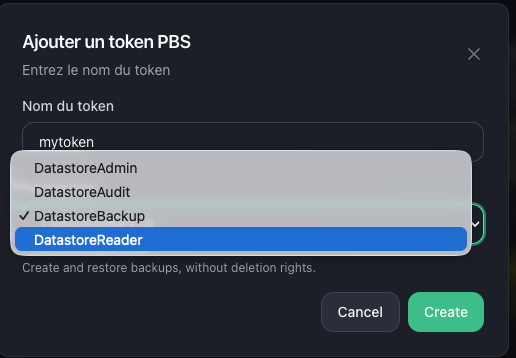 2. Copy the secret now: it will not be shown again.
3. To revoke, delete the token from the same tab. Any server using it loses access immediately.
2. Copy the secret now: it will not be shown again.
3. To revoke, delete the token from the same tab. Any server using it loses access immediately.
The token is created on the Proxmox Backup Server with the matching ACL on your datastore, so it works both from the dashboard and directly with proxmox-backup-client or Cloud-PBS TUI.