Get started with Cloud-PBS
Your first steps with Cloud-PBS: sign in to the dashboard, secure your account, create an API token, connect your Proxmox VE server, and run your first backup.
Last updated: July 22, 2026
Everything is managed from the Cloud-PBS dashboard: your datastores, API tokens, backups, notifications and billing. You sign in with your Cloud-PBS account, there is no separate Proxmox Backup Server password to manage. Here is how to go from a fresh datastore to your first backup.
1. Sign in to the dashboard
Open app.cloud-pbs.com and sign in with your account. If you don’t have a datastore yet, create one first: see Create and choose your datastore.
2. Secure your account (recommended)
Enable two-factor authentication on your account before going further. See Account security.
3. Create an API token
Your Proxmox VE server authenticates to your datastore with an API token, not a password. Open your datastore, go to the Tokens tab, and create one:
- Pick a name and a role. DatastoreBackup is enough for a server that only sends backups; use DatastoreAdmin if it should also restore and manage.
- Copy the token ID and secret now, the secret is shown only once.
See Datastore API tokens for the role details.
4. Connect your Proxmox VE server
Still in the Tokens tab, copy the ready-to-use connection command and run it on your Proxmox VE node. It registers your Cloud-PBS datastore as a Proxmox Backup Server storage. You can also add it from Proxmox VE manually, under Datacenter > Storage > Add > Proxmox Backup Server, using the repository, datastore, token and fingerprint shown in the dashboard.
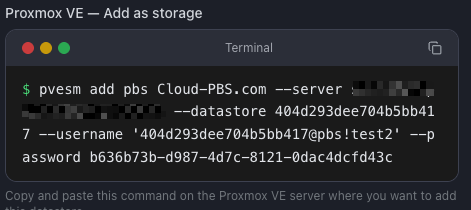
Once added, your Cloud-PBS datastore appears as a backup target in Proxmox VE.
5. Run your first backup
From Proxmox VE, back up a VM or container to your Cloud-PBS storage, or schedule it. See How to start a backup and Schedule backups from Proxmox VE.
Want end-to-end encryption? Turn it on first: enable backup encryption.
6. Next steps
- Set your retention policy: change the prune interval.
- Configure notifications by email and chat: datastore notifications and webhooks.
- Prove your backups actually restore: run a restore test.
- Join us on Discord to chat with the team.