Create and choose your datastore
Create a Cloud-PBS datastore and pick the right options: fixed-size vs Pay-as-you-go, region, replication (3-AZ), storage size, free trial and promo code.
Last updated: July 22, 2026
Two families of datastore
Cloud-PBS offers two kinds of Proxmox Backup Server datastore:
- Fixed size: a datastore with a set capacity, billed at a flat monthly price. Simple and predictable.
- Pay-as-you-go (Object Storage): no fixed quota; you pay for what you actually store. A good fit for variable or growing volumes.
For the full pricing of each model, see Billing overview.
Create one
From Datastores, click New datastore. The assistant walks you through the choices:
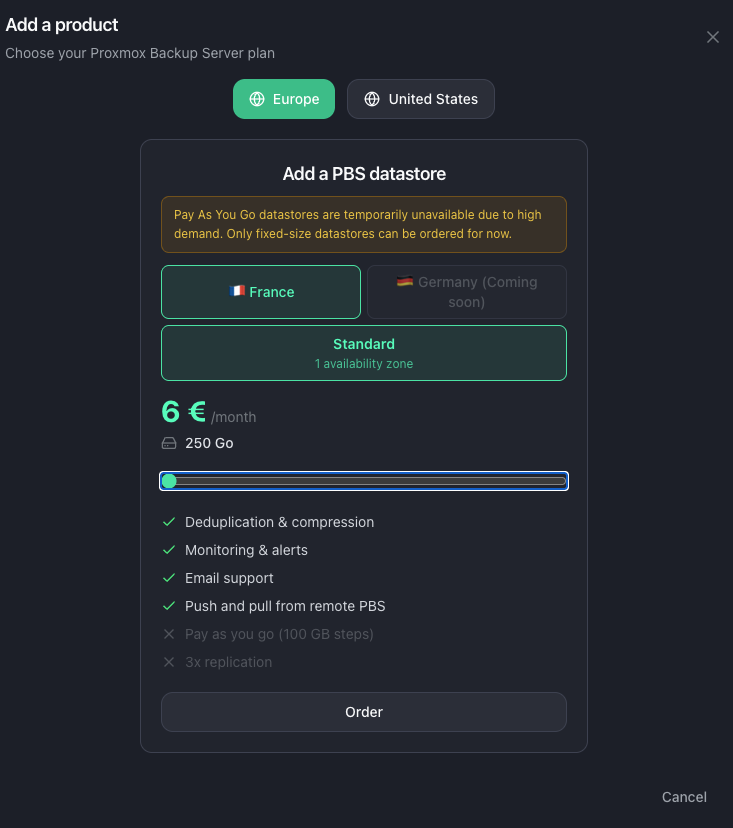
- Region: choose where your data is stored, among the available regions.
- Plan: Fixed size or Pay-as-you-go.
- Fixed size only: pick the storage size.
- Pay-as-you-go only: choose the replication level, single zone or 3 zones (3-AZ) for higher resilience.
- Free trial: your first datastore includes a 7-day free trial.
- Promo code: enter one at this step if you have it.
- Confirm and pay with Stripe, or add the datastore to an existing subscription if you already have one.
After creation
The datastore is provisioned and appears in your list. Follow the on-screen onboarding guide to create an API token, connect your Proxmox server, and start backing up. See also 6 basic things to get started.