How to configure synchronization from remote Proxmox Backup Server

Last updated: June 2, 2025

Introduction

With Proxmox Backup Server, you can configure synchronization to allow a remote server to pull or push backups from another one.

For example :

  • You are using Proxmox Backup Server on premise as your primary datastore

  • You also have a Cloud-PBS instance. You can add a specific user on your Cloud-PBS instance, add permissions to this user and configure a scheduled sync from your own Proxmox Backup Server to Cloud-PBS.

Two way (pull and/or push) is only available on dedicated instances. If you want to pull data from your server to Cloud-PBS.com, prefer a dedicated instance.

  • Pull AND push sync availability: Dedicated instances
  • Push only: Datastore offers

On Premise to Cloud-PBS configuration

This setup let you easily export your existing Proxmox Backup Server data to Cloud-PBS, making your data even more secure.

This setup is the most common from Cloud-PBS users. It lets you push your data from your server to Cloud-PBS.

Push is a very interesting feature, because it’s easy to implement and requires few network modifications (at most, authorizing port 8007 to your Cloud-PBS instance).

Let’s start by connect to your PBS server and configure the Remote part :
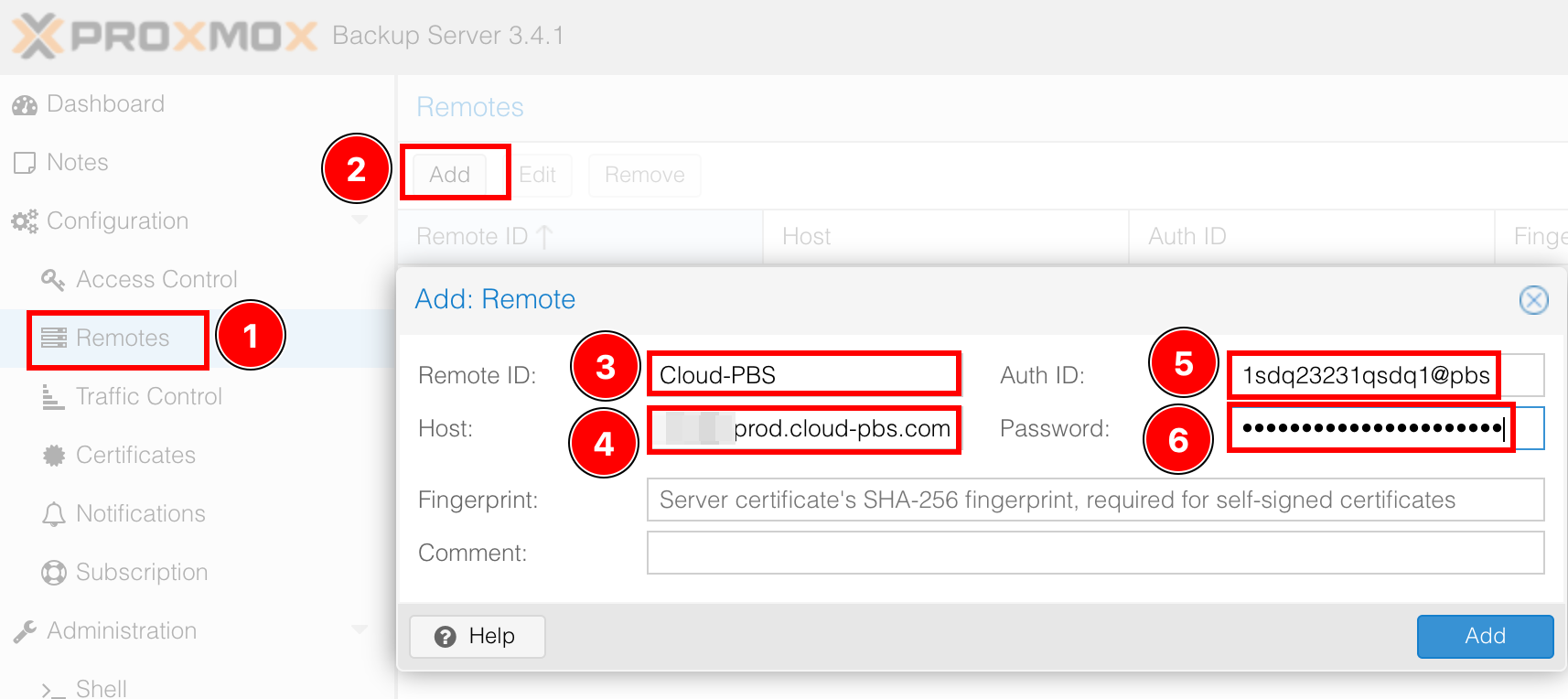
Add a remote Cloud-PBS instance

  1. Select the Remotes tab.

  2. Add a new remote target.

  3. Enter a Remote ID, add the name you want.

  4. Configure the Host from the email you received.

  5. In the Auth ID field, add the username your receveid, or use a token if you enabled 2FA.

  6. Finally add your password or your token’s secret.

No need to configure the fingerprint, as your cloud-pbs instance uses recognized certificates. The configured Cloud-PBS user needs at least the Datastore.Backup permission to push on your instance (the default username is already working).

Now you just have to configure the push job like on the screen below :
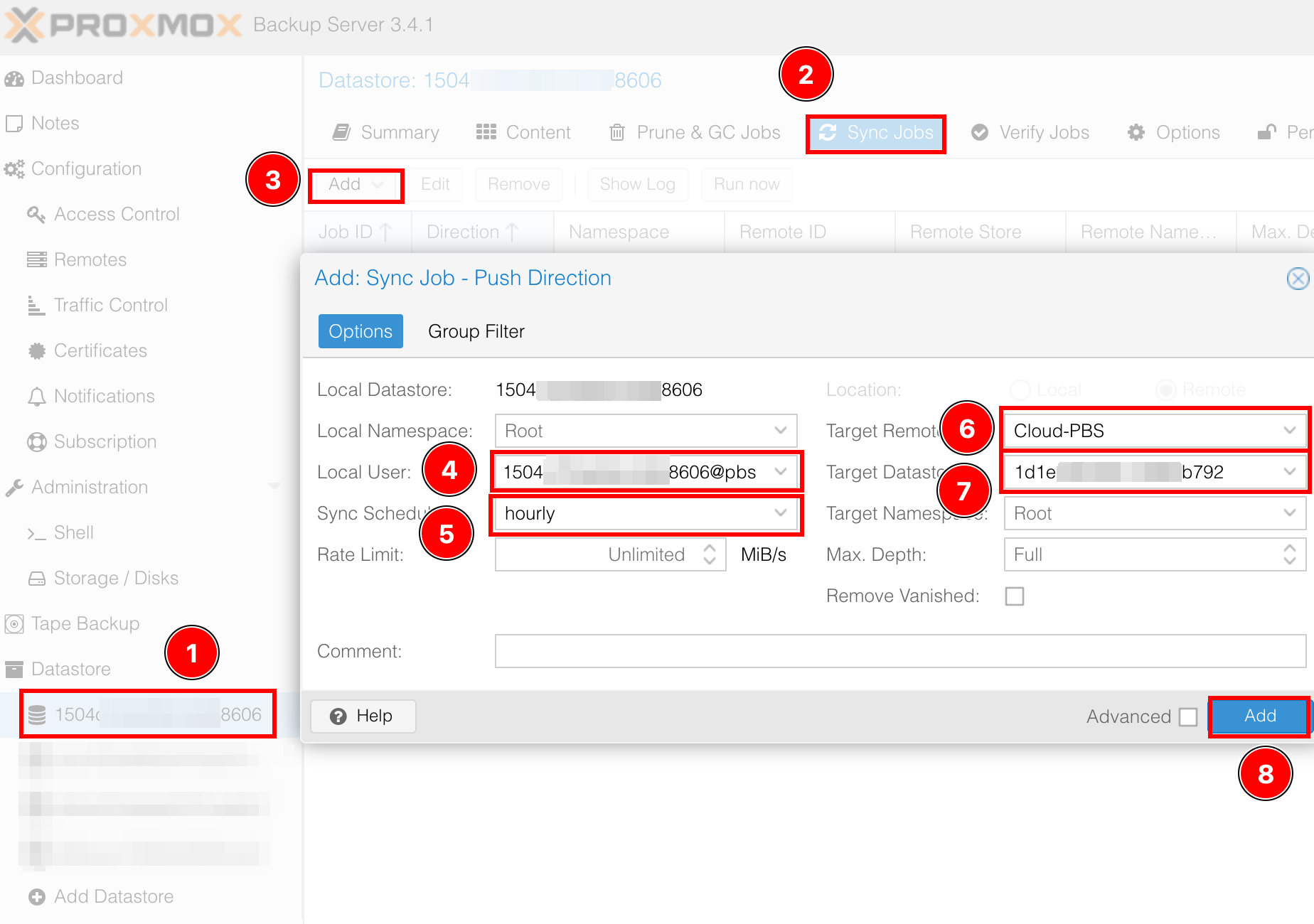
Push sync configuration job

  1. Select your on prem datastore

  2. Select the Sync Jobs tab

  3. Add a new job

  4. Select your Local User

  5. Choose the sync frequency. Default is 1 hour

  6. Select your Target Remote. This is the target configured in the previous step

  7. Then select your Target Datastore.

  8. Add your sync job and voila.

Once the job is configured, you can manually start it using the Run now button in the Sync Job tab

Sync job configuration reference

A Proxmox Backup Server sync job configuration covers four areas: the source datastore, the target remote and remote datastore, the schedule, and the transfer options. Every parameter listed below maps directly to the proxmox-backup-manager sync-job CLI command and to the corresponding entry in /etc/proxmox-backup/sync.cfg.

ParameterDescriptionDefault
idUnique sync job identifierrequired
storeSource datastore on the local PBSrequired
remoteConfigured remote targetrequired
remote-storeTarget datastore on the remote PBSrequired
ns / remote-nsSource / target namespaceroot namespace
schedulesystemd calendar eventmanual run
ownerPBS user that owns the synced dataroot@pam
remove-vanishedDelete snapshots that no longer exist at sourcefalse
transfer-lastOnly sync the N most recent backup groupsunlimited
rate-in / rate-outBandwidth limit for the sync, in bytes per secondunlimited
commentFree-form description shown in the UIempty

For the full reference, consult the official Proxmox Backup Server documentation on sync jobs at pbs.proxmox.com/docs/sync.html.

Schedule format and frequency

The schedule parameter accepts any systemd calendar event. Common patterns:

  • hourly — every hour on the hour
  • daily — every day at 00:00
  • *-*-* 02:00:00 — every day at 02:00 local time
  • Mon..Fri 09:00:00 — weekdays only at 09:00
  • *:0/15 — every 15 minutes

Validate any schedule before deploying it with:

systemd-analyze calendar "your-schedule"

The Proxmox Backup Server scheduler reads /etc/proxmox-backup/sync.cfg every minute, so a schedule change takes effect at most one minute after proxmox-backup-manager sync-job update returns.

Pull vs push sync jobs

Proxmox Backup Server supports two sync directions:

  • Push — the source PBS initiates the connection and uploads backups to the remote. Only outbound TCP 8007 from the source is required. Push is available on every Cloud-PBS plan (Shared, Dedicated, on-premise).
  • Pull — the target PBS initiates the connection and downloads backups from the remote. Requires inbound TCP 8007 on the source. On Cloud-PBS, pull mode is available on Dedicated plans only.

If your goal is to send data from an on-premise PBS to Cloud-PBS, push mode is the standard configuration covered in the section above. If you need to replicate between two Cloud-PBS instances or between two on-premise PBS servers, either mode works.

The CLI form is identical:

# Push job
proxmox-backup-manager sync-job create push-to-cloudpbs \
  --store local-store \
  --remote cloud-pbs \
  --remote-store remote-store \
  --schedule "daily" \
  --sync-direction push

# Pull job
proxmox-backup-manager sync-job create pull-from-cloudpbs \
  --store local-store \
  --remote cloud-pbs \
  --remote-store remote-store \
  --schedule "daily" \
  --sync-direction pull

Troubleshooting sync jobs

Common issues when configuring a sync job:

  • failed to authenticate — the API token or password used in the remote configuration has expired or lacks the Datastore.Backup privilege. Recreate the token and grant the privilege at the datastore level on the remote.
  • connection refused — outbound TCP 8007 is blocked at the source. Open it in the source firewall and verify routing to the Cloud-PBS instance.
  • backup owner check failed — covered in detail in our dedicated guide.
  • Sync runs but transfers nothing — verify the ns (namespace) parameter on both sides. A namespace mismatch silently skips all groups.
  • Sync is slow — check rate-in and rate-out on the job, and the underlying network throughput. Cloud-PBS regional endpoints are documented in the welcome email.

For the complete error catalog and CLI reference, see the official Proxmox Backup Server sync jobs documentation at pbs.proxmox.com/docs/sync.html and the manual page man proxmox-backup-manager.