Missing-backup alerts for Proxmox Backup Server
Cloud-PBS alerts you when a Proxmox Backup Server datastore stops receiving successful backups, down to each individual VM, with per-VM thresholds and an opt-out.
A backup you think is running, but isn’t, is worse than no backup at all: it gives you false confidence, and you find out the day you need the restore. Cloud-PBS now alerts you when backups stop happening.
Alerting on a missing backup
Cloud-PBS watches the date of the last successful backup and raises an alert when it grows older than a window you choose. You are notified by email, by webhook, and in the dashboard, where the datastore is flagged so the state is obvious at a glance.
This is the complement to Proxmox Backup Server’s own verification. Verification checks the integrity of the backups you already have; this alert watches for the absence of new ones. A broken schedule, a powered-off host, an expired token: whatever the cause, a backup that stops running no longer goes unnoticed.
What a silent miss actually looks like
Take srv-db01. Its API token expires on a Friday evening. The next backup run fails, and so does the one after it, but nobody is reading the task log over the weekend. The datastore still holds last week’s snapshots, so at a glance everything looks fine. With a 24-hour threshold on that group, Cloud-PBS sends an email on Saturday morning naming srv-db01 and the age of its last good backup. You re-issue the token, the next run succeeds, and the alert clears on its own. Three days of unprotected data became a Saturday-morning fix instead of a Monday-after-the-incident discovery.
That is the whole point. The failure mode is silence, and a threshold is what turns silence into a signal.
Set it up in seconds
The alert is configured per datastore. Open it in the dashboard, go to the Notifications tab, enable Missing backup, and set the threshold (a number of hours or days). It is active as soon as you save.
Down to each VM
A datastore usually holds several backup groups, one per VM or host, for example srv-web01 and srv-db01. Cloud-PBS evaluates each one individually, and the alert names the VM that has fallen behind, so you know exactly where to look.
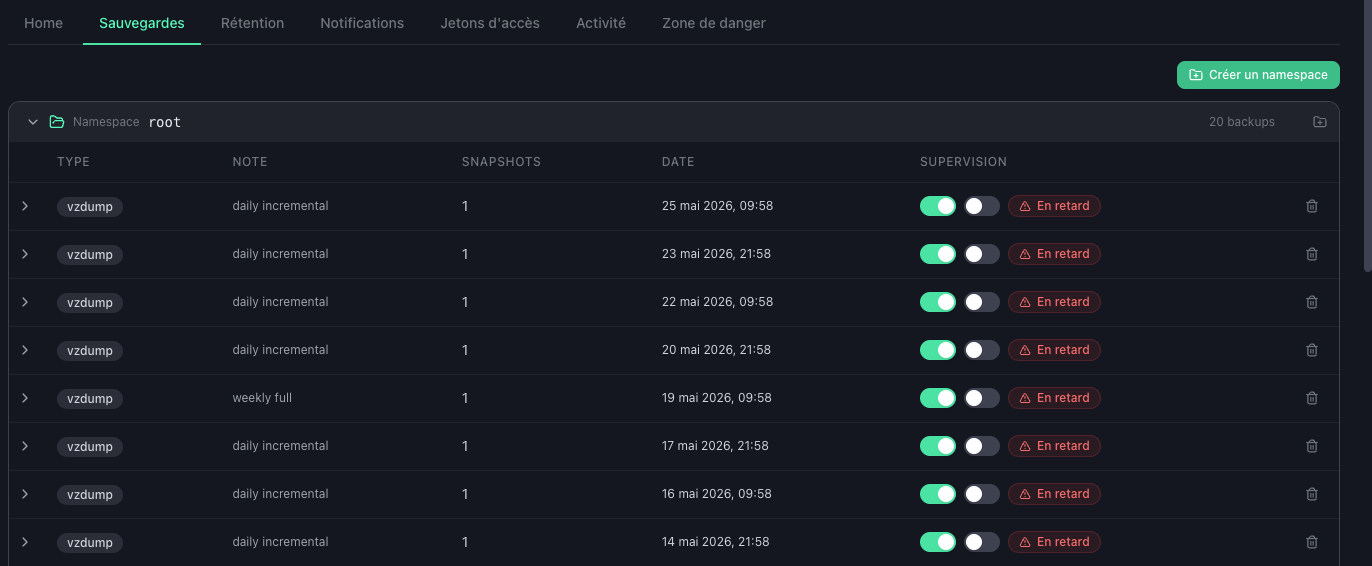
You can also tune each VM from the Backups tab:
- Give a critical VM its own threshold.
srv-db01, backed up every few hours, can warn after 6 hours, while the rest of the datastore stays on a 7-day window. - Pause supervision for a VM you no longer back up on purpose, such as a decommissioned machine whose old snapshots are still retained.
A VM whose last backup is older than its effective threshold is flagged Overdue right in the list.
Choosing a threshold that fits the job
The right threshold follows the backup cadence, not a single site-wide number. A VM backed up nightly is safe with a 36 to 48-hour window: long enough to absorb one missed run plus a retry, short enough to catch a job that has genuinely stopped. A database snapshotted every few hours wants a tight 6 to 12-hour window. A host backed up weekly needs 8 or 9 days, otherwise it alerts every week by design.
This is why the per-VM override earns its place. One datastore can mix a nightly file server, an hourly database and a weekly archive host, and each gets a threshold that matches its own rhythm. The datastore default still applies to everything you leave untouched, so you only override the exceptions.
One edge worth knowing
The check reads the snapshot history, so it measures groups that have backed up at least once. A VM you meant to protect but whose very first job never succeeded has no snapshot to age, and will not show as overdue. The rule there is the one it has always been: confirm the first backup actually lands before you treat a VM as protected. From its first successful snapshot onward, the missing-backup alert tracks it.
A short guide to get you started
When you enable the alert, a brief in-app guide walks you to the controls in the Backups tab. You can replay it anytime with the (i) button next to the alert toggle.
Available now
Missing-backup alerting is live for every Cloud-PBS datastore, at no extra cost. Open a datastore, enable the alert in the Notifications tab, and tune individual VMs from the Backups tab.
Full details are in the missing-backup alert documentation.