Meet the new Cloud-PBS dashboard
A redesigned dashboard with built-in 2FA, centralized token management, auto-scaling datastores, and everything you need to manage your Proxmox backups from one place.
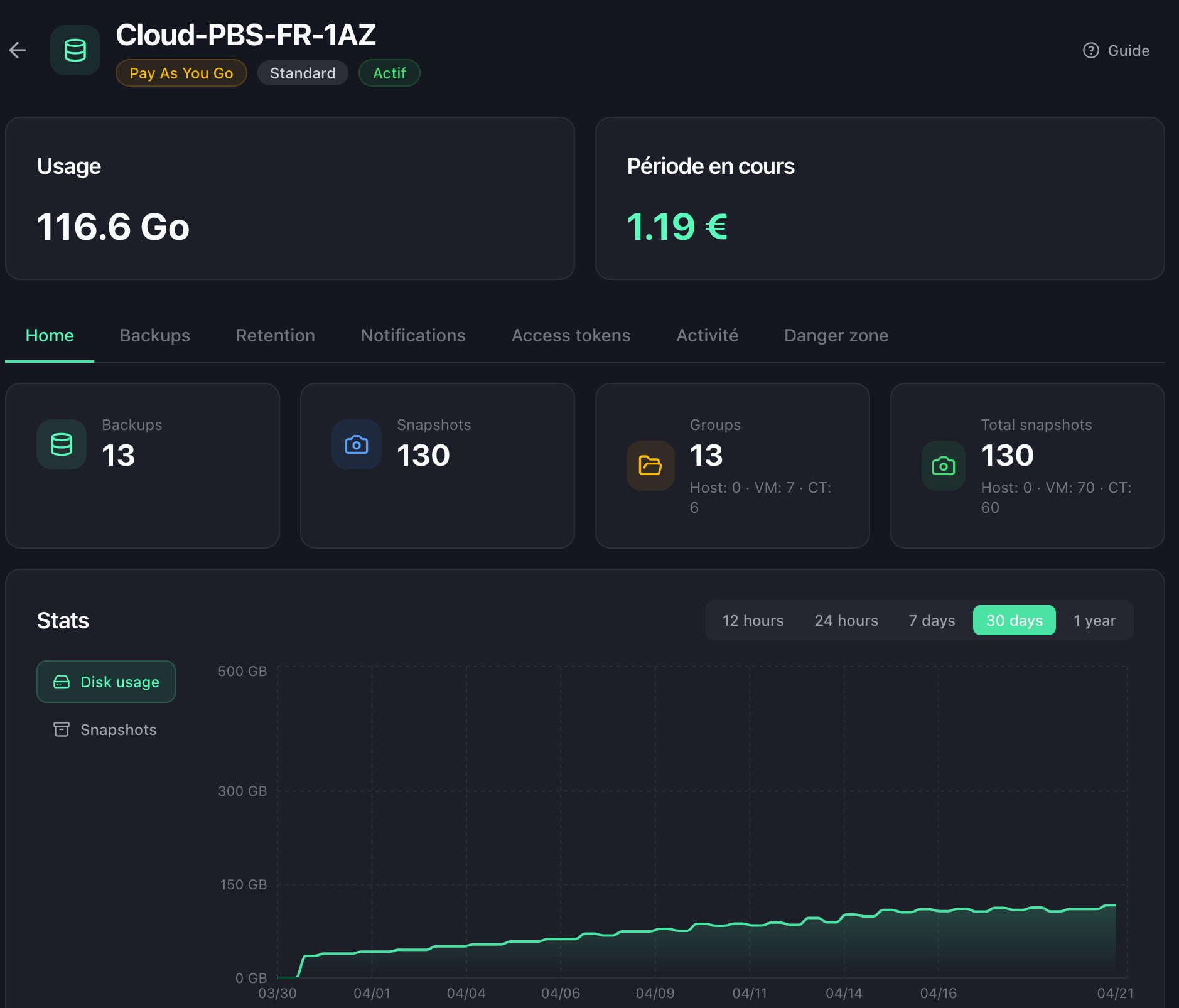
For the past few months, our team has been quietly rebuilding the heart of Cloud-PBS: the customer dashboard. Today we are excited to unveil what we believe is the cleanest, fastest, and most complete way to manage a managed Proxmox Backup Server. It is already live at app.cloud-pbs.com.
This is not a coat of paint. It is a full reimplementation built around one simple idea: everything you need to run your backups should live in one place, and it should get out of your way the rest of the time.
A cleaner, faster experience
The first thing you will notice is how responsive the whole interface feels. Pages load instantly, charts stream live from the backend, and the dark theme blends in with the rest of the Cloud-PBS world.
Under the hood, we moved to a modern Next.js foundation with a typed tRPC API and real-time metrics from VictoriaMetrics. That translates to something simple for you. When you open a datastore, you immediately see what is going on: usage today, usage over the last 30 days, backup count, snapshots, and the cost of the current billing period.
Security: 2FA is now built in
Account security is no longer an afterthought. The new dashboard ships with native two-factor authentication based on TOTP. You scan a QR code from your favorite authenticator app, and every subsequent login asks for a 6-digit code on top of your password.
For teams, you can enforce 2FA across your entire organization, and password resets now work end-to-end from the dashboard. No more back-and-forth tickets to recover access.
Access tokens, managed where they belong
One of the biggest pain points of the old dashboard was token management. Creating a PBS API token used to mean jumping into the Proxmox Backup Server UI, configuring permissions manually, and keeping track of secrets on your side.
Not anymore. Each datastore now has a dedicated Access tokens tab right in the dashboard. You create a token, pick its scope, and get your Token ID and Secret in one click. Revoking a token is one click too. This is the kind of boring-but-essential thing that should have been part of the product from day one, and now it is.
Datastores that scale themselves
Capacity planning is dead. The new Cloud-PBS datastores scale automatically as your backups grow. You no longer have to guess how much storage you will need next quarter, upgrade plans, or worry about hitting a ceiling at 2 a.m. during a restore.
The billing model is straightforward: you pay per gigabyte per hour for what you actually use, rounded up to 100 GB capacity steps, with a 100 GB monthly minimum. That is it.
Here is how it looks in practice, at our current PAYG rate of €1.30 / 100 GB / month (1-AZ) or €2.20 / 100 GB / month (3-AZ):
| Usage | Billed capacity | 1-AZ / month | 3-AZ / month |
|---|---|---|---|
| 80 GB | 100 GB (minimum applies) | €1.30 | €2.20 |
| 150 GB | 200 GB (next 100 GB step) | €2.60 | €4.40 |
| 1230 GB | 1300 GB (next 100 GB step) | €16.90 | €28.60 |
Pro-rating is down to the hour, so if you only need extra space for a one-off restore test, you only pay for the hours you actually used it. No commitments, no surprises.
Remotes: monitor another PBS, or migrate painlessly
The new Remotes section is a quiet favorite of ours. It lets you declare any other Proxmox Backup Server as a remote (yours, a legacy self-hosted instance, or a box sitting at another provider), and either keep an eye on it or pull everything you have into Cloud-PBS.
We built it with two scenarios in mind:
- Supervise a remote PBS. You already run a PBS somewhere and want one place to check its health. Add it as a remote, and its datastores, snapshots, and verification state show up alongside your Cloud-PBS instances.
- Migrate from another provider. This is where Remotes really shine. Declare your current backup target as a remote, launch a sync, and your backup history lands in Cloud-PBS without interrupting your existing schedule. Once you are satisfied, you flip your Proxmox VE host over to the new target. Zero downtime, zero lost retention.
Teams, billing, and activity
A few more things we are proud of:
- Team management. Invite collaborators with their own credentials. Every action is tied to a user and shows up in the activity log.
- Self-service billing. Invoices, payment methods, and current-period consumption are always one click away. No more writing in to ask for an old invoice.
- Webhooks and notifications. Wire up your monitoring stack in minutes. You can subscribe to backup, verification, and usage events and pipe them to Slack, Discord, email, or your own systems.
How to access it, and what happens to the old one
The new dashboard is available right now at app.cloud-pbs.com. Your existing credentials work out of the box, and setting up 2FA takes about 30 seconds.
We will keep the previous dashboard running at dashboard.cloud-pbs.com until June 1, 2026, so you have plenty of time to migrate at your own pace. After that date, the legacy interface will be retired and all traffic will redirect to the new one.
If anything feels off, or if you spot something that could be better, we want to hear from you. This release is a big step, but it is not the finish line. It is the foundation for a lot more to come.