Cloud-PBS TUI: a terminal client to back up your Linux hosts
Cloud-PBS TUI is a terminal interface that guides the configuration and execution of proxmox-backup-client on a Linux host. A factual overview of the tool and its current state.
Backing up a Linux host to a Proxmox Backup Server goes through the official proxmox-backup-client. It is a thorough, reliable tool, but entirely command-line driven: you need to know the target repository, the datastore, the namespace, supply an API token, assemble the right paths, handle encryption and schedule the runs. For occasional use, or when standardising across a fleet, the margin for error is real.
We built Cloud-PBS TUI to address that: a text-mode interface that guides those steps, without hiding anything proxmox-backup-client does underneath. Here is a factual look at the tool and where it stands.
WARNING
Cloud-PBS TUI is still under active development. Side effects are possible and the tool is not yet recommended for production use. Test it on non-critical hosts and validate restores before relying on it in production.
What it is, and what it is not
Cloud-PBS TUI is a terminal application (a TUI, terminal user interface) written in Go. It runs straight in a console, with no graphical server, which makes it usable on a workstation as well as on a server over SSH.
One key point: the tool does not embed the code of proxmox-backup-client. It invokes it as a subprocess. The official client must therefore be installed separately on the host. Cloud-PBS TUI does not reimplement backup: it builds the commands, runs them and surfaces their output. The backup logic stays Proxmox’s own.
The binary is compiled statically (CGO_ENABLED=0), with no external dependency, to stay portable across Linux distributions.
The screens
The interface is organised into five screens, reachable with keys 1 to 5.
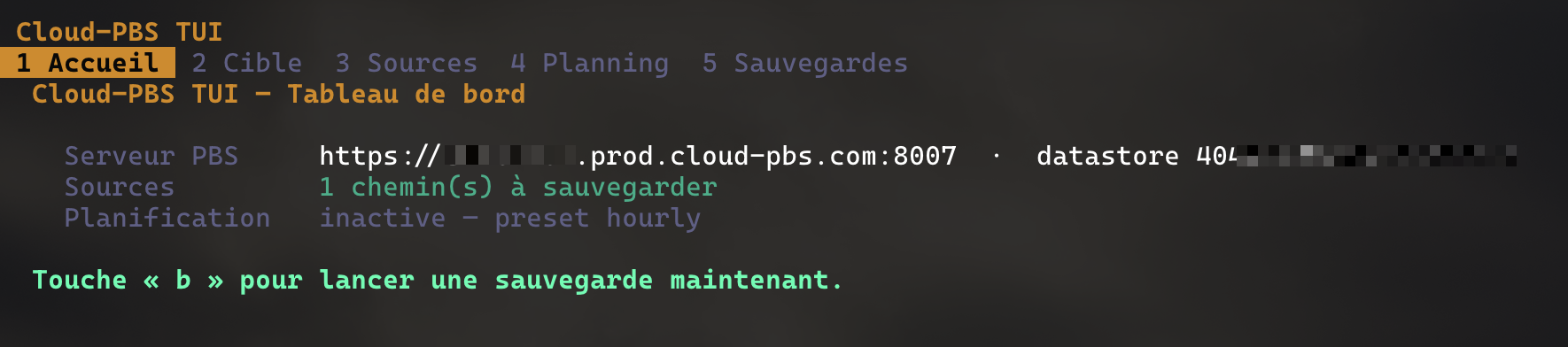
Home. A summary view of the current configuration: PBS target, selected sources, active schedule, UI language and installed version. The footer recalls the three available actions: run a backup (b), switch language (l), check for updates (u).
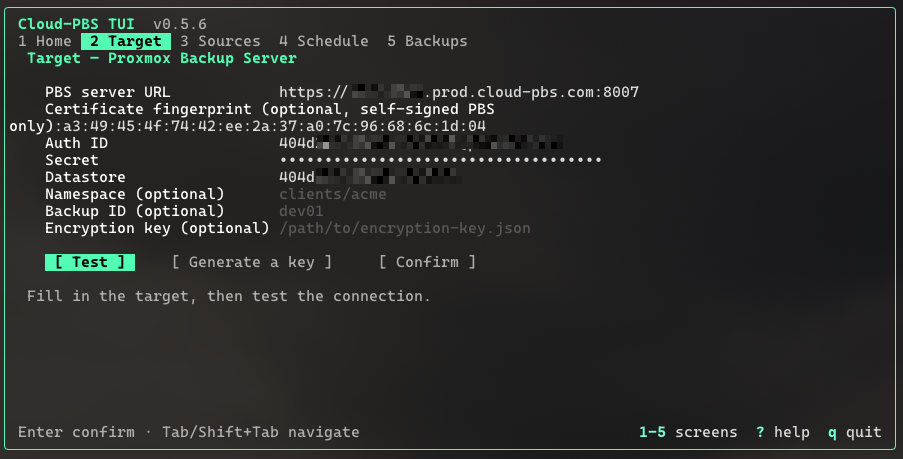
Target. The connection form for the Proxmox Backup Server: repository address, datastore, namespace and API token. The certificate fingerprint is optional and only required for self-signed PBS; a PBS fronted by a public certificate (Let’s Encrypt, internal CA) does not need it. Fields are validated before being saved.
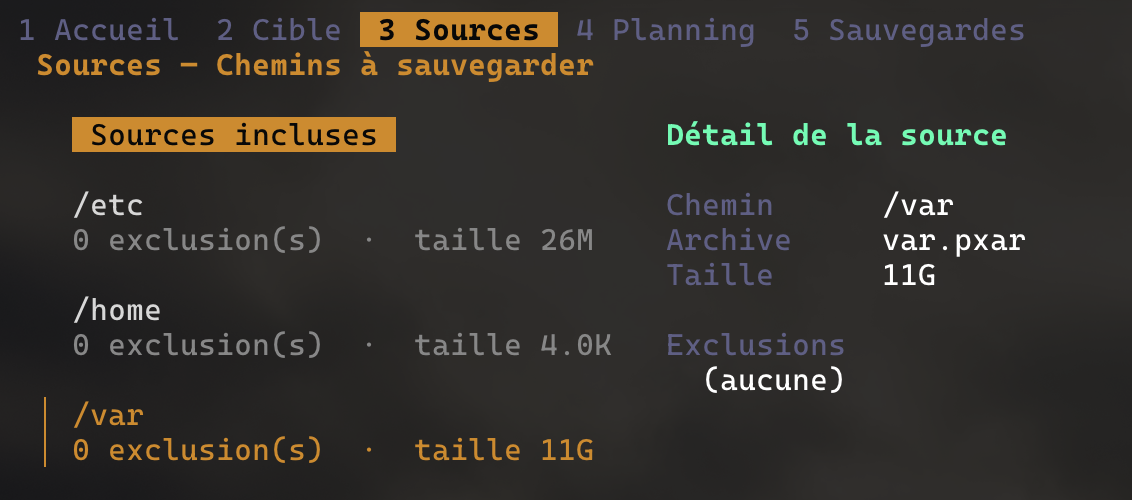
Sources. The selection of paths to include in the backup. You browse the filesystem tree to add or remove directories, with an estimate of the volume involved.
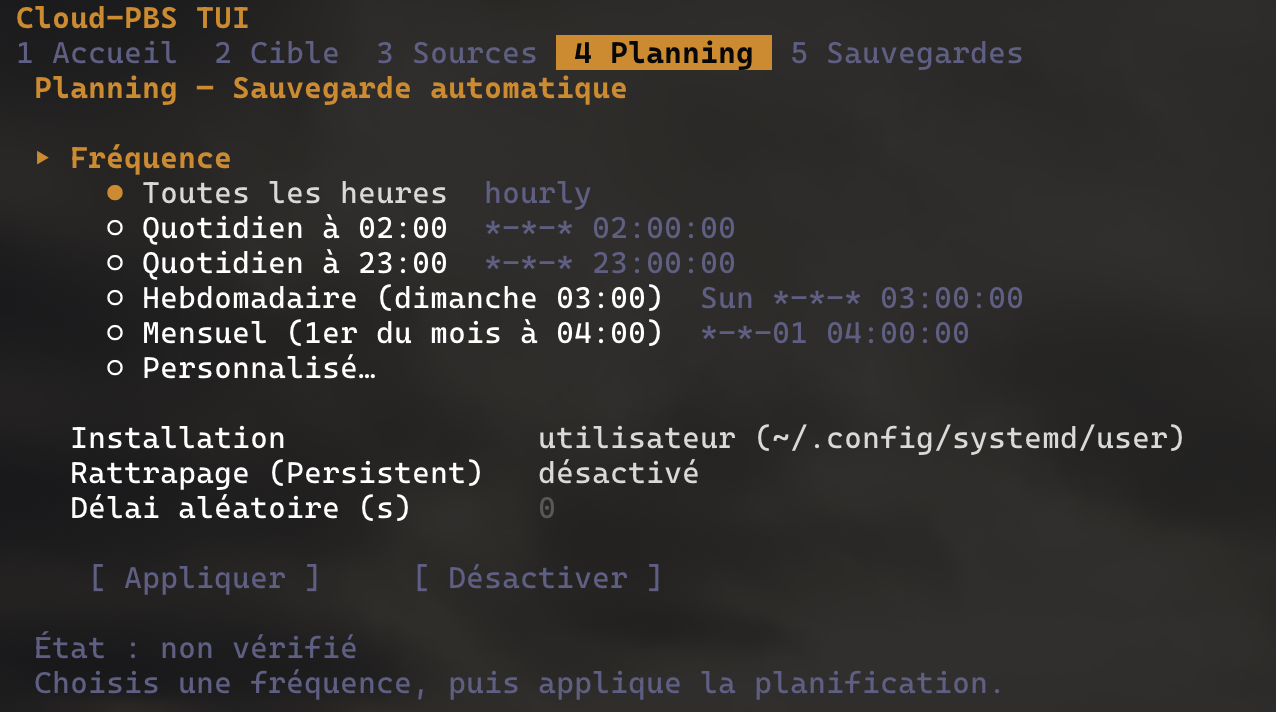
Schedule. Recurring backup scheduling. The screen generates the matching systemd units (.service and .timer) from presets: hourly, daily at 02:00 or 23:00, weekly, monthly, or a custom OnCalendar expression.
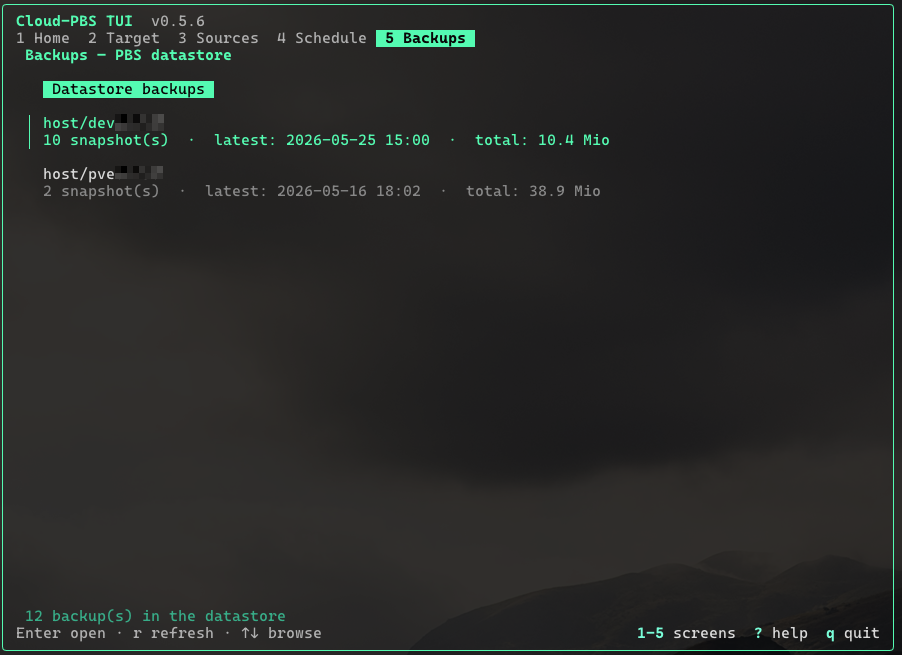
Backups. Browsing the snapshots present in the datastore, and restoring them. The screen opens on a two-level view: a list of backup groups (host/dev01, host/pve01…), one row per host, sorted by most recent activity. Enter on a group drills into the dated snapshots inside it. Each snapshot row lists the archive names it contains (root, etc, opt…) so two same-host snapshots are easy to tell apart.
Token permissions are tested along the way: a token limited to Datastore.Backup can write backups without necessarily being allowed to read them. The screen flags this rather than failing without explanation.
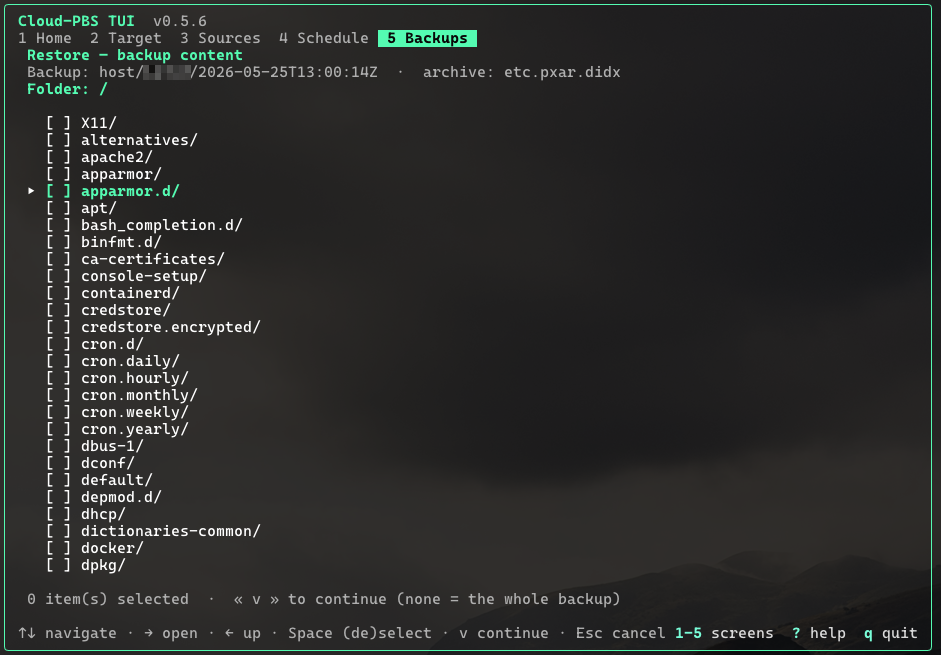
Restoring is selective: once a snapshot is picked, the archive is mounted through FUSE and you tick the exact files or directories to bring back. Ticking nothing restores the whole archive.
Running a backup happens from a dedicated panel that streams the logs in real time, while proxmox-backup-client processes the sources.
Encryption
Cloud-PBS TUI can generate a client-side encryption key, via proxmox-backup-client key create. The backup is then encrypted before it leaves the host.
The key is generated without a passphrase (--kdf none): the secret lives only in the key file, whose confidentiality relies on filesystem permissions. The tool never overwrites an existing key, to avoid making backups unreadable by accident.
Built-in updates
From the Home screen, the u key opens a small update manager: it queries the latest version published on cloud-pbs.com, displays the running version next to it and, if a newer release is available, downloads the binary, verifies its SHA-256 against SHA256SUMS and atomically replaces itself in place. Quit and relaunch the tool to run the new version.
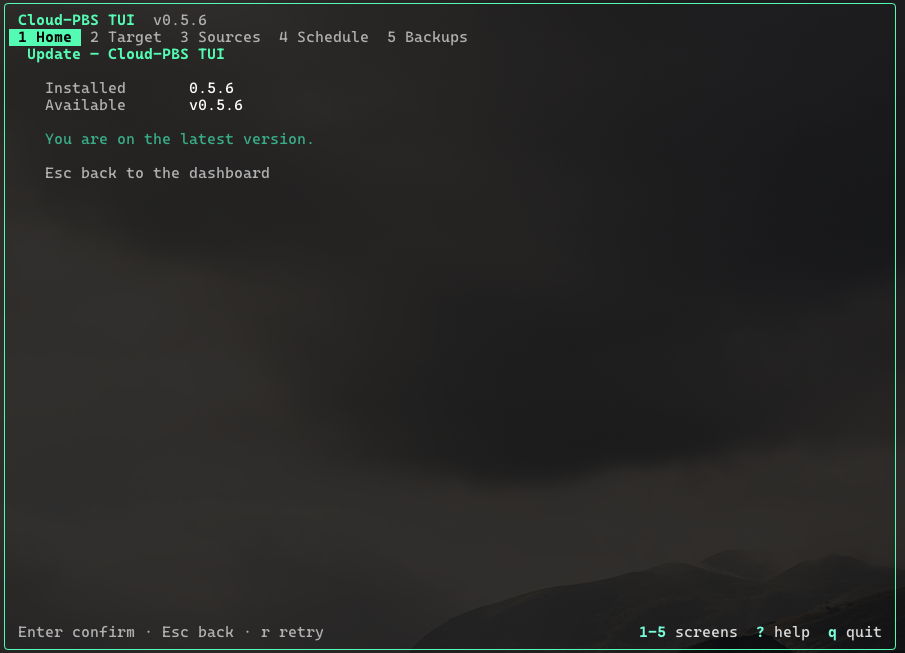
The replacement is safe even while the binary is running: Linux keeps the inode alive until the process exits. The atomic rename ensures the file is never half-written.
Configuration
Configuration is stored locally, in the standard XDG directories (~/.config/cloudpbs-tui for configuration, ~/.local/state/cloudpbs-tui for logs). The API token is treated as a secret. Configuration is read back at startup: you find your target, your sources and your schedule from one session to the next.
Where the project stands
Development progresses in milestones. As of today:
- target, sources and schedule configuration is complete;
- backup execution with real-time logs works;
- client-side encryption is in place;
- browsing snapshots and restoring them, in full or file by file, is available;
- a built-in update manager (
ukey from Home) keeps the tool up to date; - a continuous integration pipeline builds and publishes the Linux binaries (
amd64) on every release.
Several versions have been published, the latest being v0.5.6 (see the release notes below).
Still to come: .deb packaging for installation through apt, and opening up the source code once the licence is finalised. The tool is under active development.
Download
Cloud-PBS TUI is available for Linux amd64 (x86-64), the only architecture for which Proxmox ships proxmox-backup-client.
Automatic installation (recommended)
The install script sets up Cloud-PBS TUI and its dependencies (proxmox-backup-client, FUSE):
curl -fsSL https://cloud-pbs.com/downloads/cloudpbs-tui/install.sh | sudo bashIt auto-detects the host’s Debian release (bookworm / trixie / bullseye) and pulls proxmox-backup-client from the matching Proxmox repository, or its static binary on non-Debian distributions, then installs Cloud-PBS TUI.
Updating
Once installed, the simplest way to update is from inside the tool: open the Home screen (key 1) and press u. The built-in update manager pulls the latest version, verifies its SHA-256 and replaces the binary in place.
Manual installation
The binary is built and published with every release. The links below always point to the latest version:
- Cloud-PBS TUI for Linux amd64
- SHA256SUMS: SHA256 checksums
After downloading, verify the archive then extract it:
sha256sum -c SHA256SUMS
tar xzf cloudpbs-tui-linux-amd64.tar.gz
./cloudpbs-tui
Reminder: proxmox-backup-client must be installed separately on the host to run an actual backup.
Release notes
v0.5.6
- The generated systemd service unit now sets
Environment=HOME=%hso scheduled backups can find the PBS secret when running under the system manager.
v0.5.5
- The
.serviceunit’sExecStartnow resolves the binary path dynamically, fixing scheduled backups when Cloud-PBS TUI is installed outside/usr/bin. The built-in updater regenerates the unit after each install so the path stays correct.
v0.5.4
- Built-in update manager: press
uon Home to check, download (with SHA-256 verification) and install the latest version in place.
v0.5.3
- Backups screen reorganised in two levels: a list of backup groups (host/id) first, then the dated snapshots once a group is opened. Stays usable on a host backed up many times a day.
- Each snapshot row now lists the archive names it contains (
root,etc,opt…) instead of a generic counter, so two same-host snapshots are easy to tell apart. - Certificate fingerprint is optional: PBS servers with a publicly-signed certificate (Let’s Encrypt, internal CA in the system trust store) no longer require the fingerprint — the client falls back to standard TLS verification.
- Default UI language is now English, regardless of the system locale. Switch from Home with
l.
v0.5.2 / v0.5.1
- Installer hardening: auto-detection of the Debian release (Debian 13 trixie included), and cleaner
install.shexit on success.
v0.5.0
- Bilingual interface, English and French, switchable from Home at any time.
- The tool version is shown in the header.
v0.4.2
- Selective restore: a backup’s contents can be browsed (through a FUSE mount) to pick the exact files or directories to restore, instead of the whole archive.
- Create a folder directly from the destination step.
v0.4.1
- Interface centered in a framed panel, for better readability on wide terminals.
- Colors aligned with the Cloud-PBS brand.
Who it is for
Cloud-PBS TUI is aimed at administrators backing up Linux hosts to a Proxmox Backup Server, whether a managed Cloud-PBS instance or a self-hosted PBS. It is a component of our Cloud-PBS ecosystem, built first for our own use, and which we are opening up gradually.
Running a Linux fleet where backups to PBS take more of your time than they should? Let’s talk.